
Making a PHP and Bootstrap Dropdown Menu

Making a PHP and Bootstrap Dropdown Menu
Hello everyone, in this post I will talk about how you can make a dropdown menu using PHP and Bootstrap. If I have to give an example, the image below will be a good one.
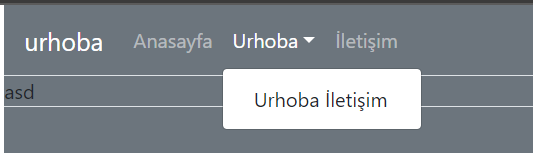
Let me say from the beginning, I didn't make a special design for this article and I directly took the navbar codes from Bootstrap and combined them with PHP.
Click here to view the Bootstrap Navbar page.
Database Settings
First, we create a new database as utf8-bin, I am currently working on a blog script so I named it "urhobablog" and created it. After creating the database, we create a table for our menu.
Since it will be in the upper part of the site, which we call the header, I named it "ub_headermenu".
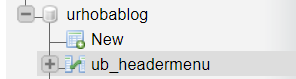
I added my rows in the table I created as below to specify the menu title, the page it goes to, and which menu is the submenu of which.

Let's examine these rows a bit more.
ub_menuID is the "id / identity" assigned to the menu and we use this ID to define other menus as its submenus, also we set this part to auto-increment so this row is unique.
ub_menuName is the name that will appear on the screen for this menu. For example, from the image above, we type names like "urhoba", "Home Page" here.
ub_menuURL is the link address of the page the menu will redirect to.
ub_manuParent is where, if the menu is a submenu, you enter the "ub_menuID" of which menu it is a child of. If it is "0", it means it is not a submenu of any menu.

If any of you use Unity3D, you can think of this as a parent-child relationship.

Creating the Header with HTML
<nav class="navbar navbar-expand-lg navbar-<?PHP $design->NavColorControl(); ?> bg-<?PHP $design->BgColorControl(); ?> border-bottom">
  <a class="navbar-brand" href="<?PHP $site->SiteURL(); ?>"><?PHP $site->SiteName(); ?></a>
  <button class="navbar-toggler" type="button" data-toggle="collapse" data-target="#navbarNavDropdown" aria-controls="navbarNavDropdown" aria-expanded="false" aria-label="Toggle navigation">
    <span class="navbar-toggler-icon"></span>
  </button>
  <div class="collapse navbar-collapse" id="navbarNavDropdown">
    <ul class="navbar-nav">
      <?PHP $menu->HeaderMenu(); ?>
    </ul>
  </div>
</nav>
Here I actually directly used the navbar codes I took from Bootstrap and deleted the part where the menu values are entered, and called the menu function from the class I created with PHP.
<?PHP $menu->HeaderMenu(); ?>
With the code above, I fetch the data from the function I wrote in PHP.
Fetching Data with PHP
Config.php
<?PHP
## Classes
$menu = new Menu;

## Site URL
$site_url = "http://192.168.1.31/urhobablog/"; ## Please write the site URL including the /

## Database Connection Settings
$db_host = "localhost";
$db_username = "root";
$db_password = "root";
$db_database = "urhobablog";
Here I create the variables necessary to connect to the database and at the same time pull the classes I created in "function.php" and assign them to a variable.
The parts that will be useful for you here are the "$menu" variable under "Classes" and the "Database Connection" part.
In the menu part, we pull the class that we created in function.php, and in the database connection part, we enter the required information to connect to the database.
Function.php
<?PHP
include_once 'config/config.php';

function DBConnect()
{
    try {
        global $db_connection;
        $db_connection = new PDO("mysql:host=" . $GLOBALS["db_host"] . ";dbname=" . $GLOBALS["db_database"] . "", $GLOBALS["db_username"], $GLOBALS["db_password"]);
    } catch (PDOException $e) {
        print $e->getMessage();
    }
}

function DBClose()
{
    $GLOBALS["db_connection"] = null;
}

class Menu
{
    function HeaderMenu()
    {
        DBConnect();
        $query = $GLOBALS["db_connection"]->query("SELECT * FROM ub_headermenu WHERE ub_menuParent = '0'", PDO::FETCH_ASSOC);
        if ($query->rowCount()) {

            foreach ($query as $row) {
 $query2 = $GLOBALS["db_connection"]->query("SELECT * FROM ub_headermenu WHERE ub_menuParent = '{$row["ub_menuID"]}'", PDO::FETCH_ASSOC);
                if ($query2->rowCount()) {
                    echo ' <li class="nav-item dropdown">
                    <a class="nav-link dropdown-toggle"  href="' . $row["ub_menuURL"] . '" id="navbarDropdownMenuLink" data-toggle="dropdown" aria-haspopup="true" aria-expanded="false">
                  ' . $row["ub_menuName"] . '</a><div class="dropdown-menu" aria-labelledby="navbarDropdownMenuLink">';
                    foreach ($query2 as $row2) {
                        echo ' <a class="dropdown-item" href="' . $row2["ub_menuURL"] . '">' . $row2["ub_menuName"] . '</a>';
                    }
                    echo '</div></li>';
                } else {
                    echo ' <li class="nav-item"><a class="nav-link" href="' . $row["ub_menuURL"] . '">' . $row["ub_menuName"] . '</a></li>';
                }
            }
        }
        DBClose();
    }
}
Here, we created a function called "DBConnect" and established a connection to the database with this function. With the "DBClose" function, we terminated our connection to the database.
We created a class called "menu" and a function called "Header Menu" inside it. Now, the reason I use a class here is to combine all menus under this class and pull them where necessary, thus getting rid of code clutter.
If I need to explain the header menu part, we connect to the database with "DBConnect" and first with foreach we search for menu items in the database which are not submenus, and print them on the screen. ($query here is our first query and is querying those that are not submenus.)
Inside the results of our first query, we run a second query, and if the menu we are pulling with foreach has submenus, we also pull the submenus with a new foreach and print them on the screen.

You can access the source codes of this project from the link below
If you have any questions or anything you are curious about regarding this topic, feel free to ask me in the comments section below.
Yorum Gönder