
Pins on the Raspberry Pi

Pins and Connection Points on the Raspberry Pi
If you want to do physical projects (lighting up LEDs, working with a coin channel, ...) with Raspberry Pi and don't know how to connect the circuit components you will use in your project to your Raspberry Pi device, let us show you the pins on the Raspberry Pi 3, 4 and what they are used for.
The red pins are power output pins, with some providing 3.3V and some 5V power output.
With these power pins, you can connect accessories such as a cooling fan to your device and provide their power.
The pins marked with black and labeled GND can be defined as ground lines, and these are the negative outputs.
The ones marked red show the + terminal of a battery, while the black marked GND pins represent the - terminal of the battery.
The pins labeled GPIO are data transfer pins, more precisely data pins, and you can manage these pins using Python.
You can write your Python code using the RPI.GPIO library or with the help of the GPIOZERO library to control the components you connect to your device through these pins.
Example code for lighting an LED with GPIZERO
from gpiozero import LED
ledPin= LED(14)
ledPin.on()
The pins shown in white and labeled DNC are "Do Not Connect" pins and are not currently used.
Come on, let's take a closer look at these pins.
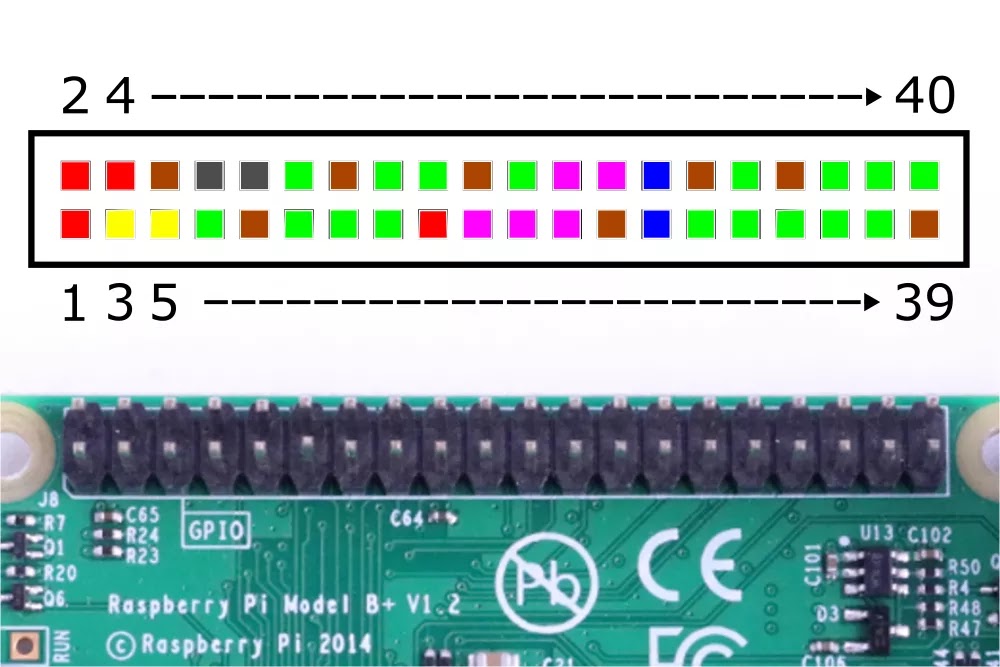
Our pins are numbered like this, left 1 right 2 left 3 right 4 and so on..

All of our power and ground pins look like this.

Our input and output pins are also like this.

These are the pins on the Raspberry Pi that allow you to communicate via l2c.

Our UART communication pins on the Raspberry look like this.

Our SPI data pins on the Raspberry are also provided with these 5 pins.

The pins called DNC or "Do Not Connect" by Raspberry Pi are these two. Of course, perhaps in the future, Raspberry Pi may assign a function to these pins.
Yorum Gönder