
Using Arduino Leonardo as a Bluetooth Keyboard (Typing Messages Sent from Phone as if with a Keyboard)
Using Arduino Leonardo as a Bluetooth Keyboard (Typing Messages Sent from Phone as if with a Keyboard)
Hello friends, in this post I'll explain how we can use Arduino Leonardo to print messages sent from a phone via Bluetooth to a connected device, essentially creating a Bluetooth keyboard.
If you're wondering why I did this, I had a Raspberry and a Bluetooth keyboard, but unfortunately when I installed Ubuntu Desktop on the RPI4, I couldn't connect the Bluetooth keyboard directly, and since I was too lazy to set up connection settings via remote access, I thought of connecting the Arduino Leonardo via USB and then sending messages from the phone via Bluetooth and printing them. Since this seemed easier than accessing the RPI remotely, I tried it and it worked.
After completing the Ubuntu Desktop installation and being able to access the desktop, I was able to connect the keyboard smoothly thanks to a program called blueman. But until then, I managed this way. Now that we've explained why, let's get into the coding part.
Connection Diagram
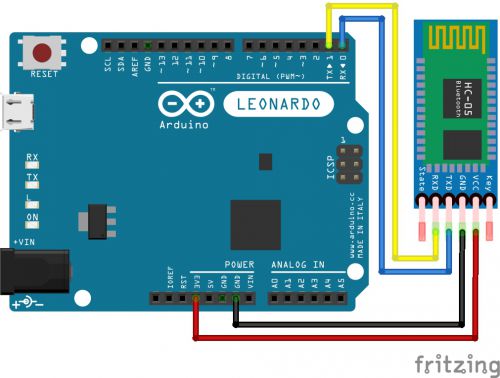
Arduino Codes and Explanations
#include <Keyboard.h> // Library to Control the Keyboard

void setup() {
  Serial1.begin(38400); // We Connect to Bluetooth Module.

}
char gelenKarakter; // Variable to Hold the Character Received from the Phone

void loop() {
  BT(); // We Call the Function

}

void BT() {
  if (Serial1.available() > 0) { // If Data is Coming from Bluetooth
    gelenKarakter = Serial1.read(); // Set incomingCharacter to the Received Data
    Keyboard.print(gelenKarakter); // Press the Key on the Keyboard
    Keyboard.releaseAll(); // Think of it as Lifting Your Finger from the Key
  }

}
Yorum Gönder