
Creating a Hangman Game with Visual Studio C# Form Application

Creating a Hangman Game with Visual Studio C# Form Application
Hello friends, in this post, I will explain how you can create a hangman game on a Form Application using Visual Studio and C#. Let’s get started right away without making the introduction too long.If we talk about the features of the game;
It presents the player with a random word and asks them to find it, gives as many lives as the number of letters in the word, and each mistake decreases the number of lives. Then, with a simple mathematical calculation, when lives reach 0, the character is fully hanged. It allows guessing the word and letters, and if you guess the word correctly, it says you have guessed it correctly. If you guess the letters correctly, it shows where in the word that letter appears.
Elements I used
- 2 panels
- 8 picture boxes
- 3 buttons
- 5 labels
- 1 textbox
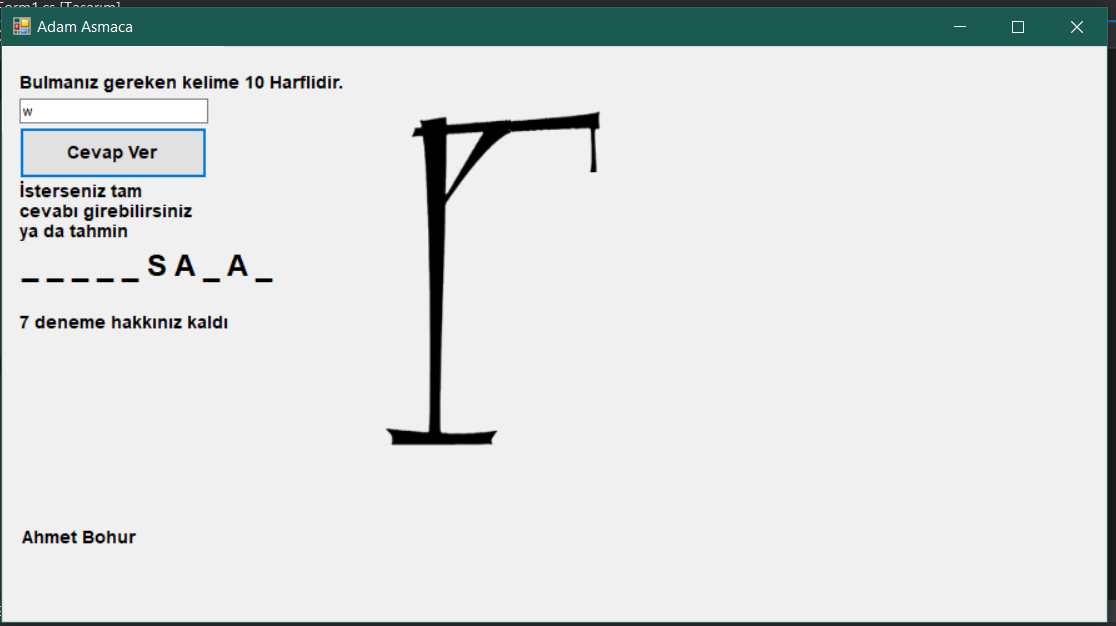
Visually, the form design part should look like this.
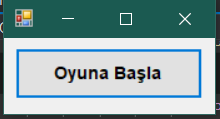
Of course, the start game panel here needs to be fixed to the far left and top, and I moved the elements to the side for you to see them.

I will provide the code directly, as it is already explained in the code.
/*
Ahmet Bohur // 19.02.2020
Hangman Game

  */
using System;
using System.Collections.Generic;
using System.ComponentModel;
using System.Data;
using System.Drawing;
using System.Linq;
using System.Text;
using System.Threading.Tasks;
using System.Windows.Forms;

namespace Adam_Asmaca_Oyunu
{
    public partial class Form1 : Form
    {
        public string bulunacak_kelime;
        public string[] bulunan_harfler;
        public int can;
        public double resim_parcalari = 0;


        public Form1()
        {

            InitializeComponent();
            // Ensuring the form size is small at the beginning
            this.Size = new Size(185, 100);
            this.MaximumSize = new Size(185, 100);
            this.MinimumSize = new Size(185, 100);
        }
        // Word selection
        string Bulunacak_Kelime()
        {
            Random rand = new Random();

            string[] kelimeler = new string[10];
            kelimeler[0] = "Love";
            kelimeler[1] = "Romance";
            kelimeler[2] = "Car";
            kelimeler[3] = "Betrayal";
            kelimeler[4] = "Effort";
            kelimeler[5] = "Computer";
            kelimeler[6] = "Software";
            kelimeler[7] = "Friendship";
            kelimeler[8] = "Comradeship";
            kelimeler[9] = "Teacher";
            int random_sayi = rand.Next(0, kelimeler.Length);
            return kelimeler[random_sayi];
        }

        private void button1_Click(object sender, EventArgs e)
        {
            // Close Panel 1
            panel1.Visible = false;

            // Assigning the word to be found and uppercasing its letters.
            bulunacak_kelime = Bulunacak_Kelime().ToUpper();
            can = bulunacak_kelime.Length;
            label4.Text = can.ToString() + " attempts left";


            // Char array to show found letters
            bulunan_harfler = new string[bulunacak_kelime.Length];
            label3.Text = "";
            for (int i = 0; i < bulunacak_kelime.Length; i++)
            {
                bulunan_harfler[i] = "_ "; // At first, as letters are not found, we put _
                label3.Text += bulunan_harfler[i].ToString();
            }

            // Providing information about the word to be found
            Label1.Text = "The word you need to find has " + bulunacak_kelime.Length.ToString() + " letters.";

            // Opening Panel 2 and enlarging the form size.
            panel2.Visible = true;
            Form1.ActiveForm.Size = new Size(900,500);
            Form1.ActiveForm.MaximumSize = new Size(900, 500);
            Form1.ActiveForm.MinimumSize = new Size(900, 500);
        }

        private void Form1_Load(object sender, EventArgs e)
        {
            // Making background color transparent so images do not cover each other
            pictureBox1.BackColor = Color.Transparent;
            pictureBox2.BackColor = Color.Transparent;
            pictureBox3.BackColor = Color.Transparent;
            pictureBox4.BackColor = Color.Transparent;
            pictureBox5.BackColor = Color.Transparent;
            pictureBox6.BackColor = Color.Transparent;
            pictureBox7.BackColor = Color.Transparent;
            pictureBox8.BackColor = Color.Transparent;
        }

        private void button2_Click(object sender, EventArgs e)
        {
            try
            {
                bool dogru_bildimi = false;

                // Checking word guess
                string girilen_kelime = textBox1.Text.ToUpper();


                if (string.IsNullOrEmpty(girilen_kelime) && string.IsNullOrWhiteSpace(girilen_kelime))
                {
                }
                else
                {
                    if (girilen_kelime == bulunacak_kelime)
                    {
                        // If correct, first clear label 3 and then write the correct word with spaces between the letters.
                        label3.Text = "";
                        for (int i = 0; i < bulunacak_kelime.Length; i++)
                        {
                            label3.Text += girilen_kelime[i] + " ";
                        }
                        Oyunu_Kazandin();
                    }
                    else
                    {
                        label3.Text = "";
                        // If the entered word is wrong, take the first letter of the guessed word and go through letter elimination.
                        for (int i = 0; i < bulunacak_kelime.Length; i++)
                        {
                            if (girilen_kelime[0] == bulunacak_kelime[i])
                            {
                                bulunan_harfler[i] = girilen_kelime[0] + " ";
                                dogru_bildimi = true;
                            }
                        }


                        // If all the guessed letters are correct, the answer is also correct. We did this.
                        if (bulunan_harfler.Contains("_ ") == false)
                        {
                            Oyunu_Kazandin();
                        }
                        Dogru_Bildimi(dogru_bildimi);


                        for (int b = 0; b < bulunacak_kelime.Length; b++)
                        {
                            label3.Text += bulunan_harfler[b];
                        }
                    }
                }
            }
            catch
            {
                MessageBox.Show("There is currently a system error.");
            }
        }
        void Dogru_Bildimi(bool dogru_bildimi)
        {
            if (!dogru_bildimi)
            {
                if (can > 0)
                {
                    // If a letter is also wrong, we decrease the number of lives
                    can--;
                    // We inform how many attempts are left
                    label4.Text = can.ToString() + " attempts left";
                    // A simple calculation for visuals to show how many steps for the full image to display
                    resim_parcalari += (8.0 / bulunacak_kelime.Length);
                    // As a result of the calculation, we show the images
                    Resim_Parcalarini_Goster(resim_parcalari);
                    if (can == 0)
                    {

                        // If lives are at 0 and the game is over, we prevent the buttons from being clicked
                        textBox1.Enabled = false;
                        button2.Enabled = false;

                        button3.Visible = true;
                    }

                }
            }
        }
        void Oyunu_Kazandin()
        {
            label2.Text = "Correct answer, you won.";
            label4.Text = "Correct answer, you won";

            // Since the game is over, we prevent the buttons from being clickable.
            textBox1.Enabled = false;
            button2.Enabled = false;

            button3.Visible = true;
        }

        void Resim_Parcalarini_Goster(double sayi)
        {
            if (sayi >= 1)
            {
                pictureBox1.Visible = true;
                if (sayi >= 2)
                {
                    pictureBox2.Visible = true;
                    if (sayi >= 3)
                    {
                        pictureBox3.Visible = true;
                        if (sayi >= 4)
                        {
                            pictureBox4.Visible = true;
                            if (sayi >= 5)
                            {
                                pictureBox5.Visible = true;
                                if (sayi >= 6)
                                {
                                    pictureBox6.Visible = true;
                                    if (sayi >= 7)
                                    {
                                        pictureBox7.Visible = true;
                                        if (sayi >= 8)
                                        {
                                            pictureBox8.Visible = true;
                                        }
                                    }
                                }
                            }
                        }
                    }
                }
            }
        }

        private void label3_Click(object sender, EventArgs e)
        {

        }

        private void pictureBox1_Click(object sender, EventArgs e)
        {

        }

        private void pictureBox5_Click(object sender, EventArgs e)
        {

        }


        private void button3_Click_1(object sender, EventArgs e)
        {
            // Restarting the application
            Application.Restart();
        }
    }
}

Also, with the latest system I added, by including a timer and an extra label, the elapsed time is shown to the user in our project.

You can use the link below to access the source files of the application I created.
Yorum Gönder